Devanagari for AnySoftKeyBoard20111028
Publisher Description
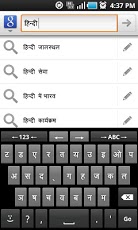
Development stopped. This app is going to die.Switch to "Hindi Keyboard for Anysoftkeyboard" to more updates and features.Install only if you can read "à ¤®à ¥‡à ¤°à ¤¾ à ¤Âà ¤¾à ¤°à ¤¤ à ¤®à ¤¹à ¤¾à ¤¨".If you see BOXES, you PHONE itself does NOT support Devanagari.Devanagari Layout extension for AnySoftKeyboard. You can use it to type Hindi, Sanskrit, Marathi etc.. Layout Based on Baraha which is far easier than INSCRIPT.Check http://www.baraha.com/help/Keyboards/dev_brhkbd.htmInstall only if you can read "à ¤®à ¥‡à ¤°à ¤¾ à ¤Âà ¤¾à ¤°à ¤¤ à ¤®à ¤¹à ¤¾à ¤¨". Else you may have to root and install Devanagari Font. If you like my work please Donate at http://sriandroid.wordpress.comSteps1. Install AnySoft keyboard from the market.http://market.android.com/details?id=com.menny.android.anysoftkeyboard2. Install this (Devanagari Layout)3. Goto Settings -> Language and Keyboards4. Enable Anysoft keyboard5. Goto AnySoftKeyboard -> Keyboards -> Enable Devanagari layout6. Click on "Click for text testing", Press hold on input box until you get a popup7. Select "Input method" -> then AnySoftKeyboardYou can switch between languages by pressing "->ABC->" button on the KeyboardWorks only if1. Devanagari Font Installed2. Device Complex Font Rendering. (Latest Indian firmwares supports)3. AnySoftKeyboard to be InstalledTo install Indic fonts, http://sriandroid.wordpress.com
About Devanagari for AnySoftKeyBoard
The company that develops Devanagari for AnySoftKeyBoard is SriAndroid. The latest version released by its developer is 20111028. This app was rated by 8 users of our site and has an average rating of 4.8.
To install Devanagari for AnySoftKeyBoard on your Android device, just click the green Continue To App button above to start the installation process. The app is listed on our website since 2013-04-27 and was downloaded 1,111 times. We have already checked if the download link is safe, however for your own protection we recommend that you scan the downloaded app with your antivirus. Your antivirus may detect the Devanagari for AnySoftKeyBoard as malware as malware if the download link to com.anysoftkeyboard.languagepack.devanagari is broken.
How to install Devanagari for AnySoftKeyBoard on your Android device:
- Click on the Continue To App button on our website. This will redirect you to Google Play.
- Once the Devanagari for AnySoftKeyBoard is shown in the Google Play listing of your Android device, you can start its download and installation. Tap on the Install button located below the search bar and to the right of the app icon.
- A pop-up window with the permissions required by Devanagari for AnySoftKeyBoard will be shown. Click on Accept to continue the process.
- Devanagari for AnySoftKeyBoard will be downloaded onto your device, displaying a progress. Once the download completes, the installation will start and you'll get a notification after the installation is finished.
Program Details
System requirements
Download information
Pricing
Version History
version 20111028-DEVANAGARI
posted on 2013-04-27
Several fixes and updates
